Screen filters and scene transitions without code on Android
32 screen filters (TV, VHS, underwater, nightmare, flashlight…) and 19 scene transitions: everything from the Filters showcase example, made without a single line of code on an Android tablet.
Make a visual novel without code on Android
Talking characters, choices, several endings, a title screen with saves, a gallery and friendship hearts: a choice story made with Yop2D, without a single line of code, on an Android tablet.
Particle effects without coding on Android
Explosions, fire, smoke, rain, snow, hyperspace, electrocution, hit stop, flash and fade: every effect from the Effects showcase example, made without a single line of code on an Android tablet.
Projects & Export
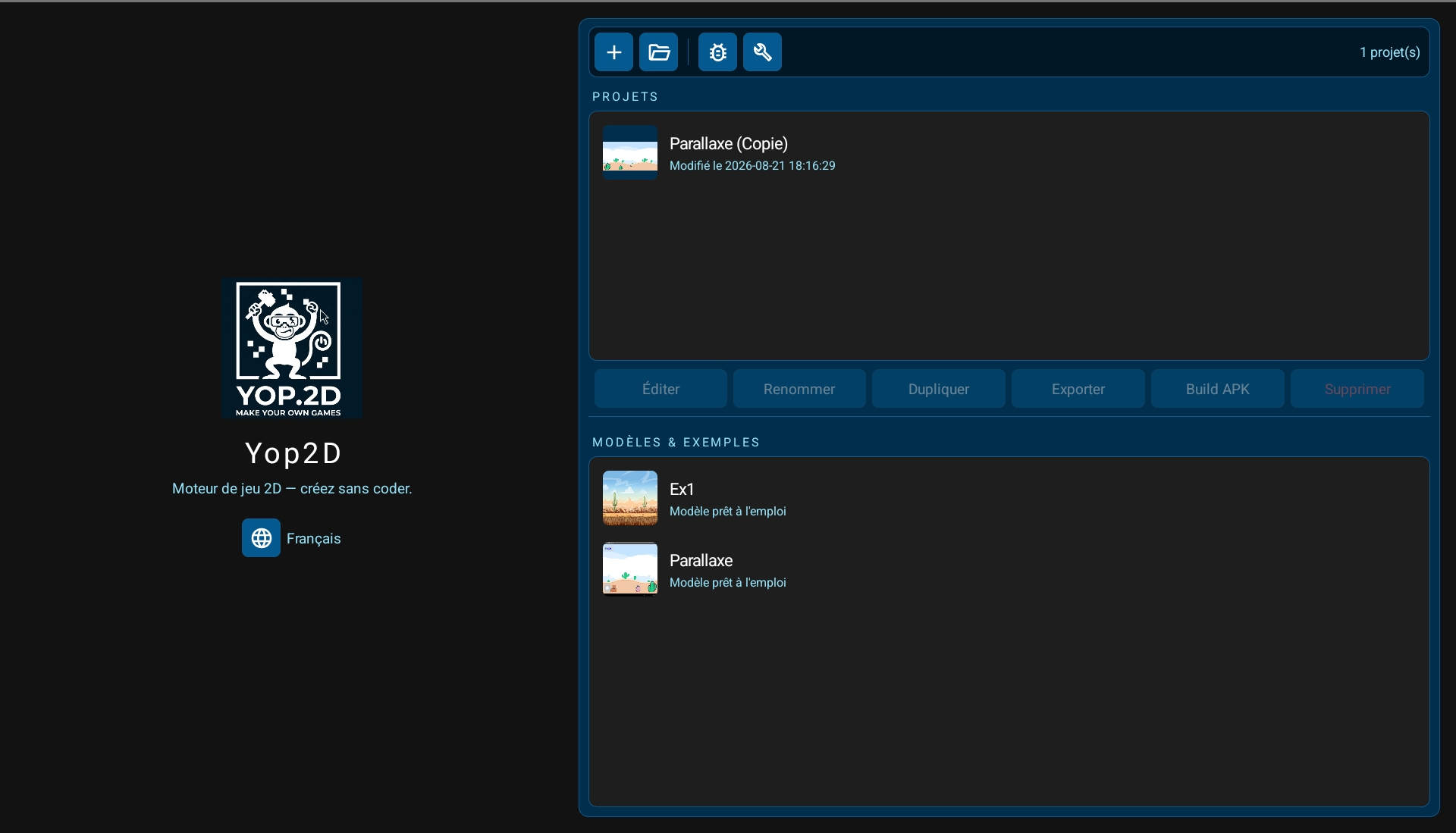
From the home screen, find your projects with their thumbnails and open the example games to learn quickly. With a single button, Yop2D builds your game into a standalone APK file, directly on your device: no computer, no server, no third-party tool.
47 templates to learn
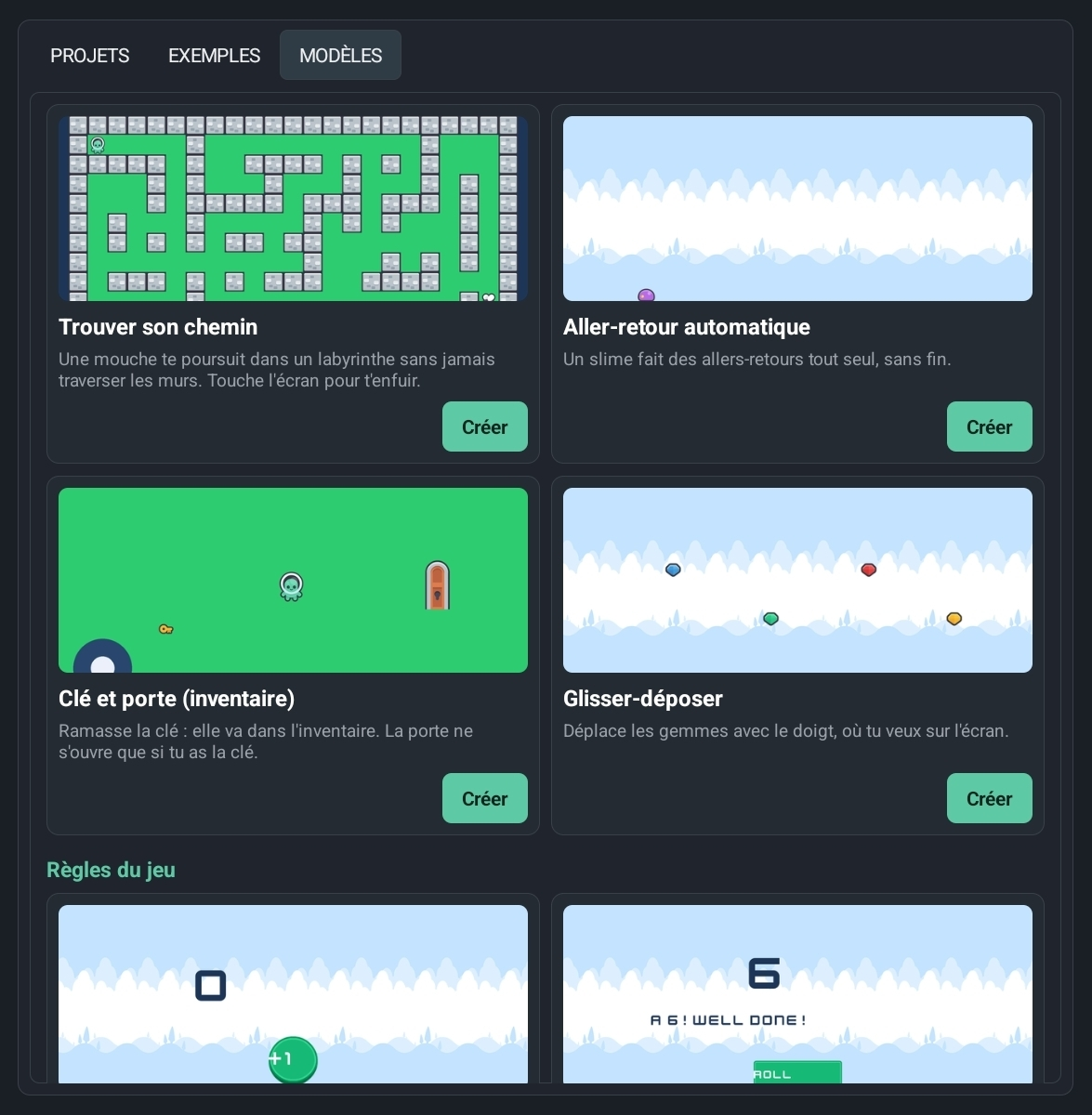
In the "Templates" tab, Yop2D asks "What game do you want to make?": 47 small projects that each show one single thing (moving, jumping, shooting, pathfinding, a variable, a HUD, a pause, particles…), sorted by category. Each template works right away and explains on screen which node does what. At the very top, the "Your first game in 5 minutes" guide takes you through it step by step.
A library that has everything
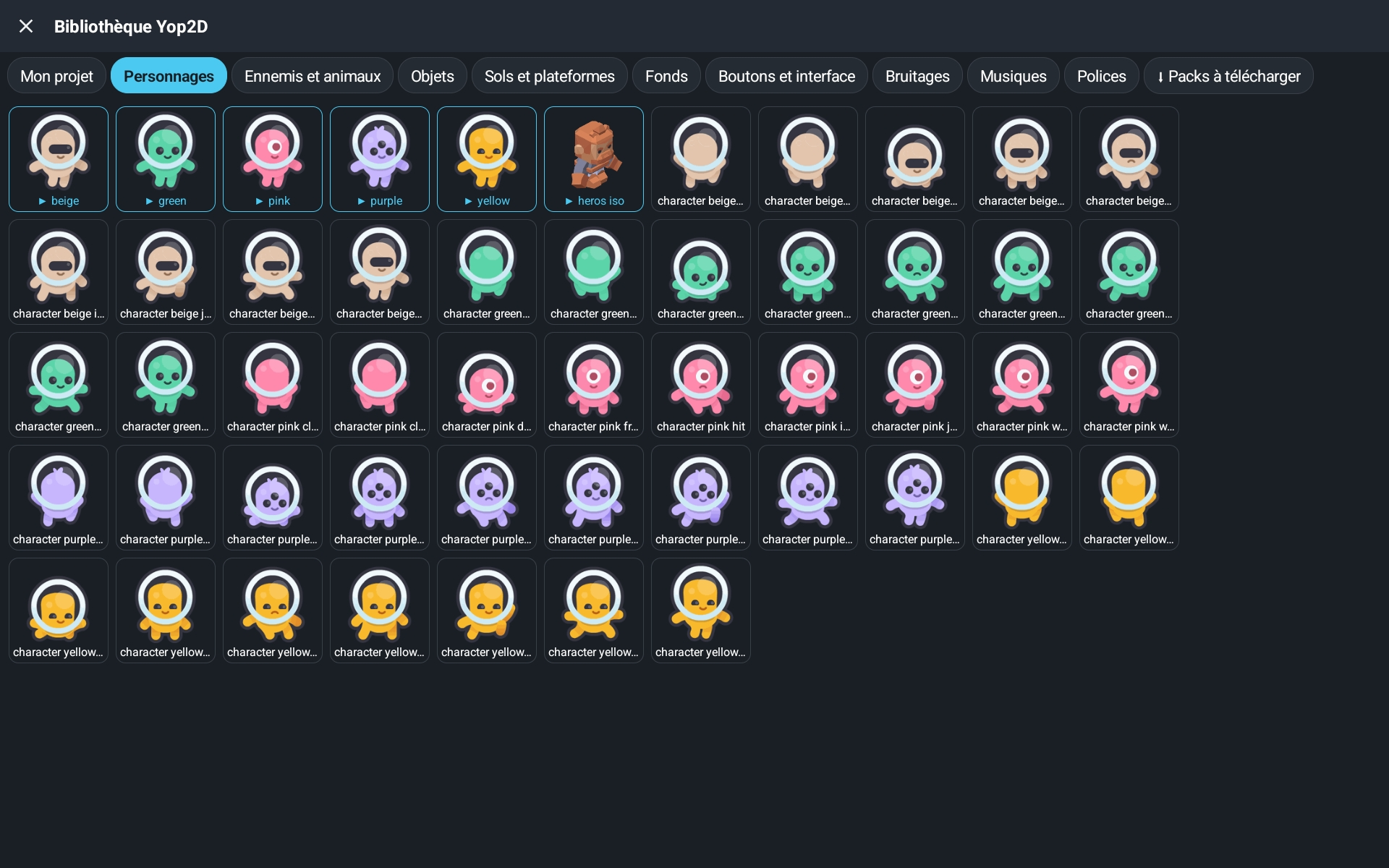
To make your first game you don't need to look anywhere else: the library is already inside Yop2D. Animated characters and enemies, objects, floors and platforms, backgrounds, buttons, sound effects, music, fonts and ready-made titles: in one tap, the image lands in your game with all its animations (idle, walk, jump…). Online packs (Pirates, Space, Hologram interface, Special effects, Plane, Monsters, Touch gestures) are added with a single button, and everything is free to use.
Visual Level Editor
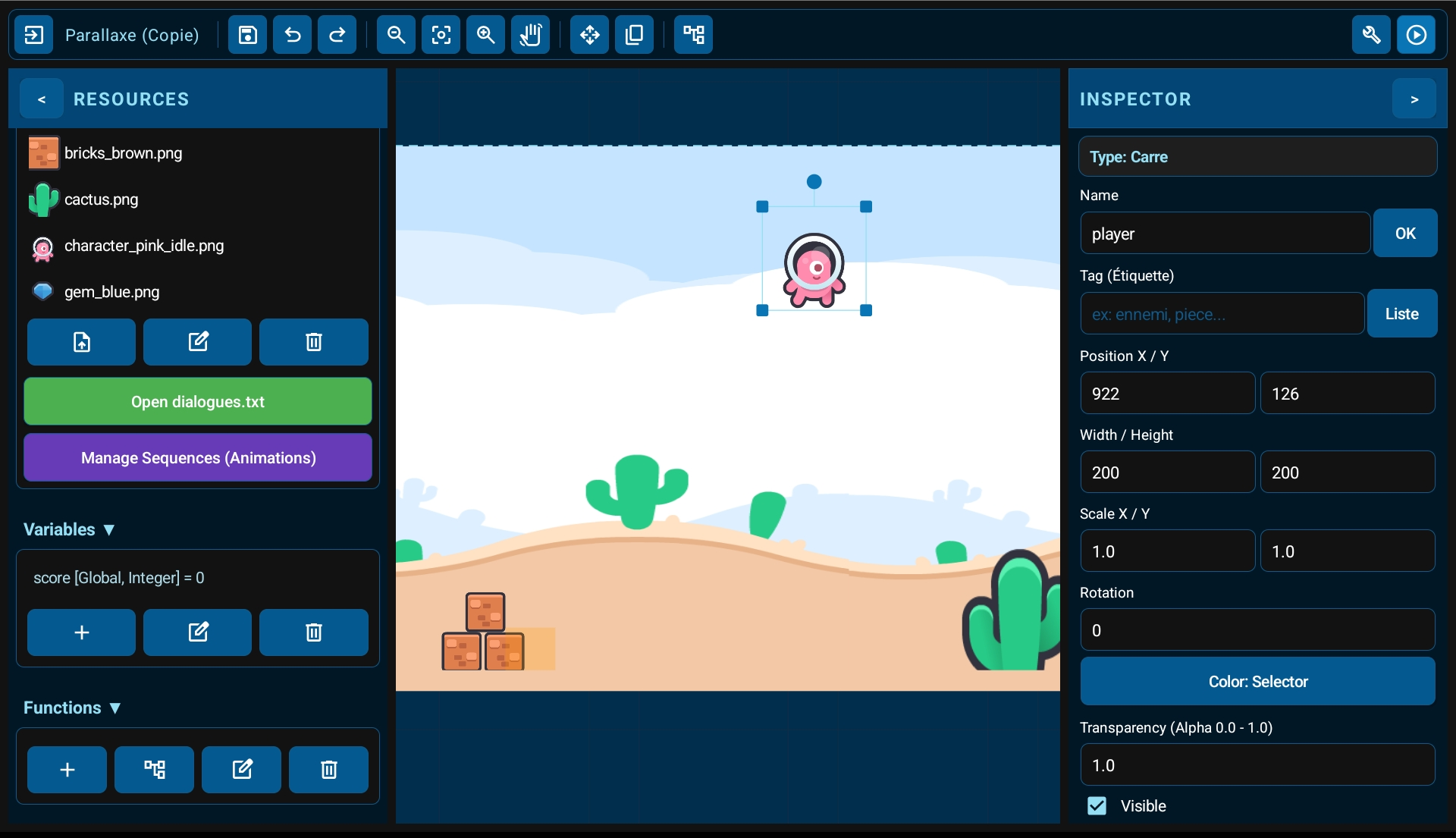
An interface inspired by professional engines, designed for touch screens. Tap an object to select it, drag to scroll the scene, and use the handles to move, resize or rotate it. Hide or lock any object with one tap so nothing gets moved by accident.
Tile-Based Levels
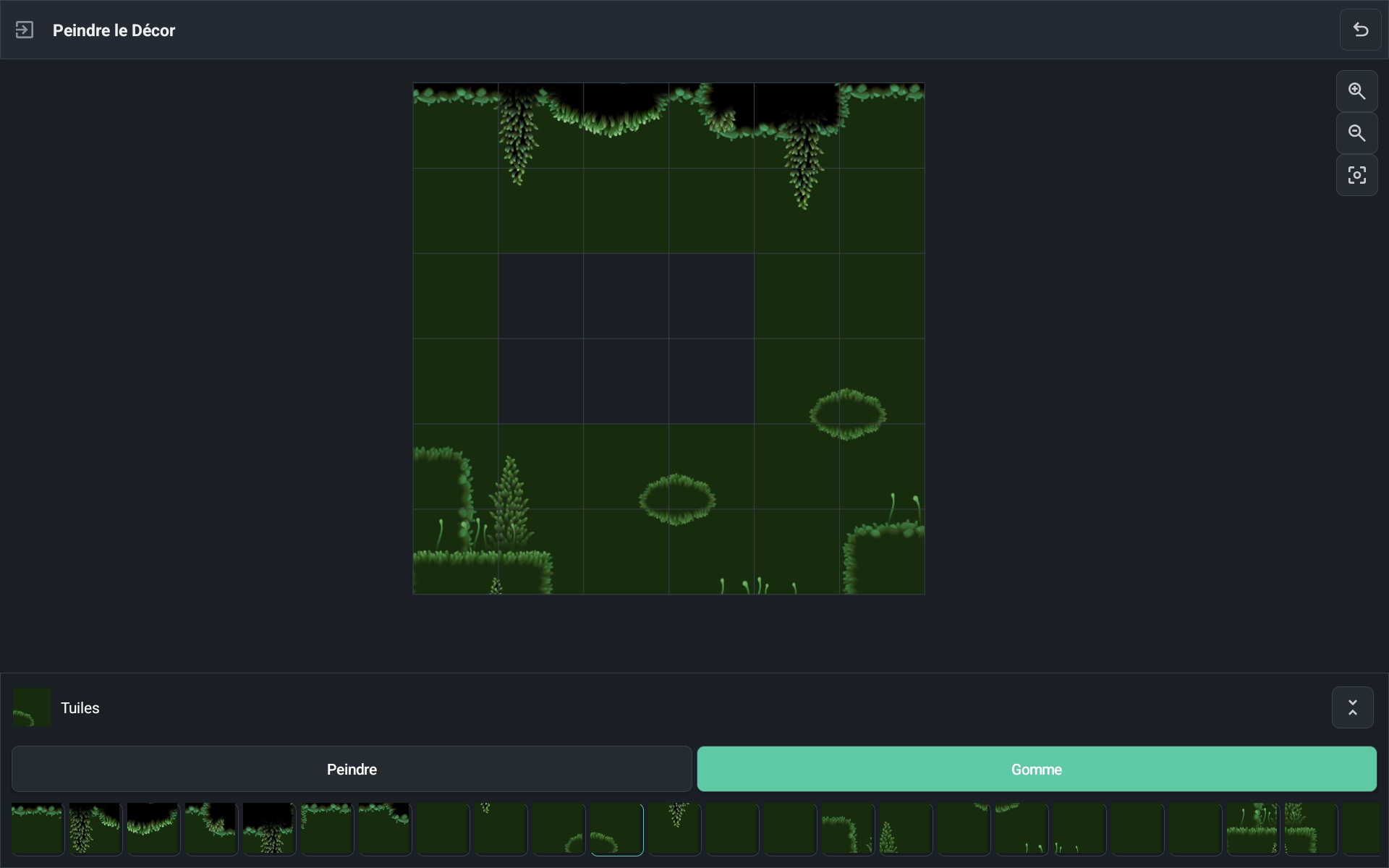
Import a tileset, paint your levels tile by tile, and mark once which tiles are solid. Collisions are handled automatically, so platformers and top-down maps are quick to build.
Real-Time Animation Editor
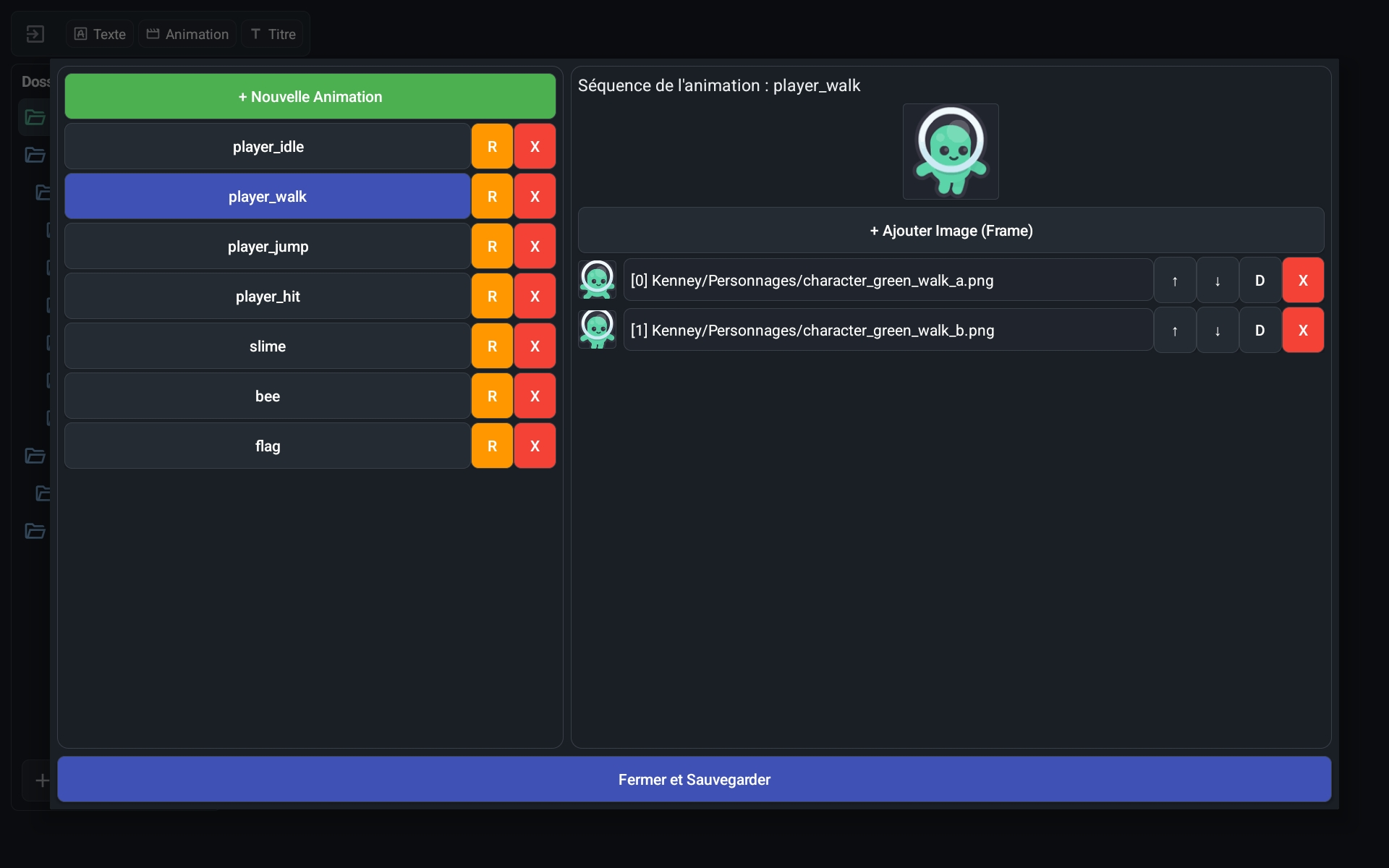
See your imported frames at a glance and preview your 2D animations in real time, right inside the engine. In game, animations follow pause and slow motion like everything else.
Built-in Titles & Text Effects
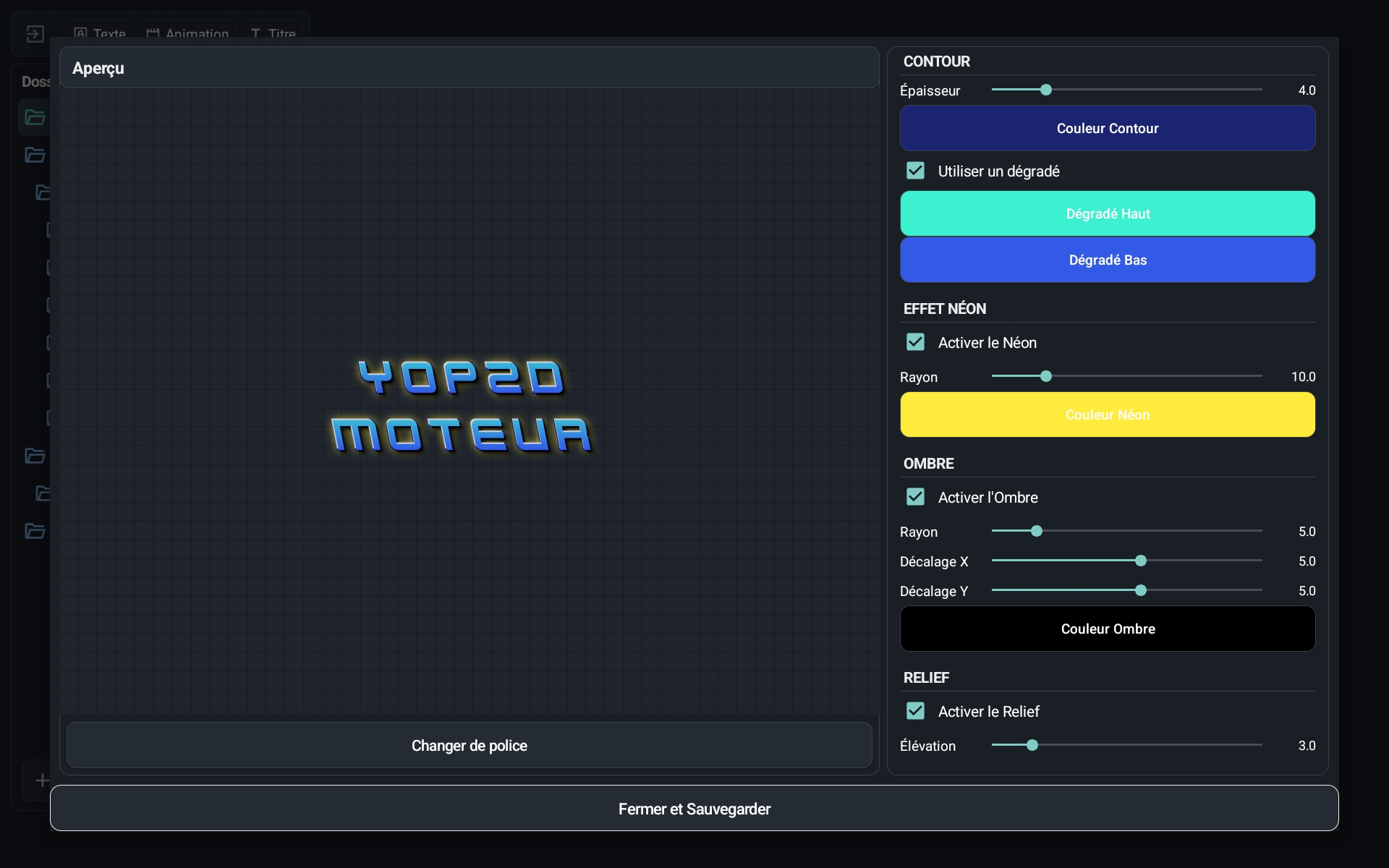
Create stylized titles (gradients, outlines, neon, shadows, relief, textures, curves) directly in the engine, instead of making heavy text images in other apps. Your final APK stays light.
Texts and dialogues in several languages
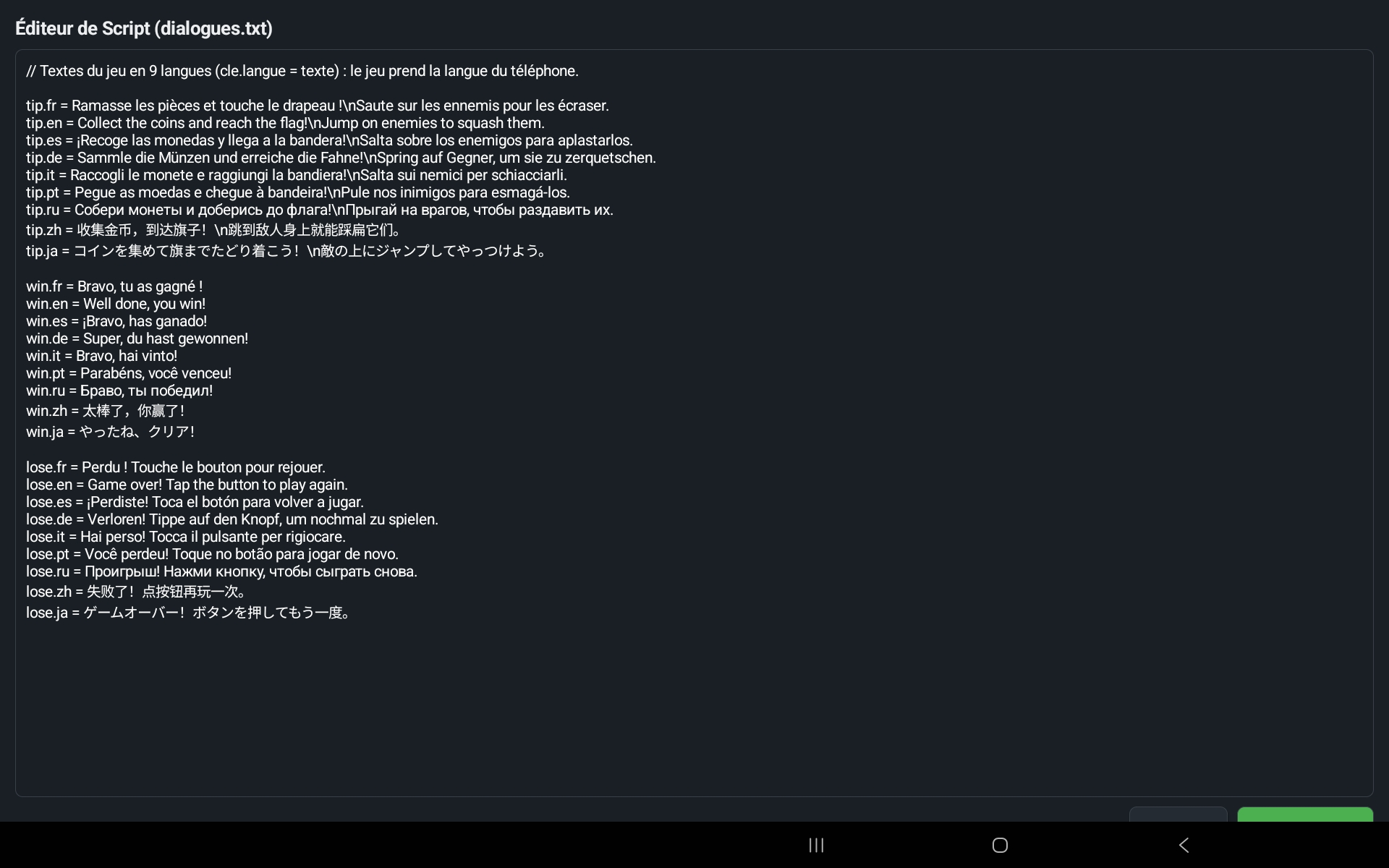
All the game texts are gathered in a single file that you can edit right inside Yop2D: one line per language (hello.fr, hello.en…). The "Show dialogue" node picks the language of the player's phone by itself: your game speaks 9 languages without any extra node.
Visual Node System
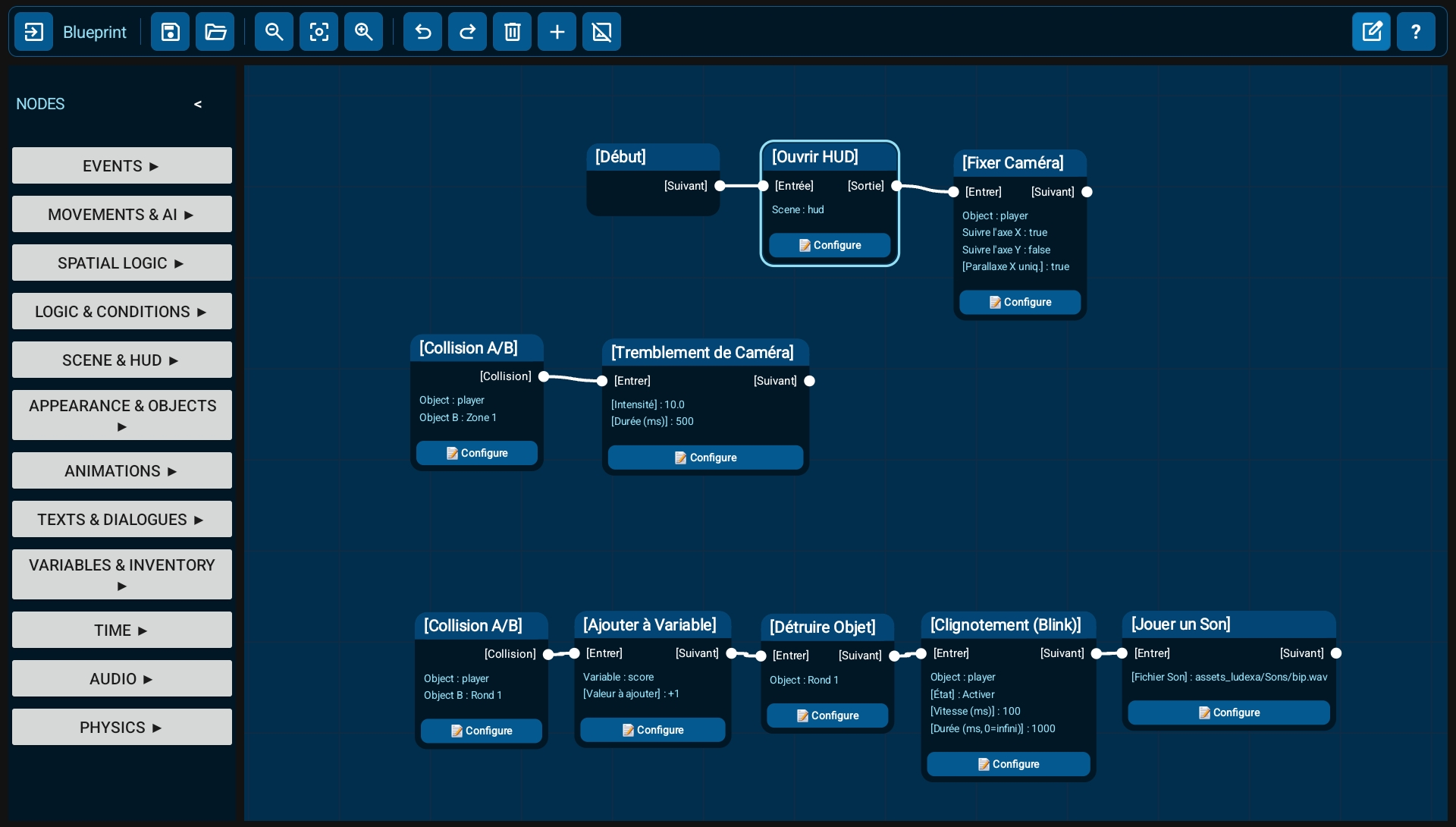
No code to write: you build your game logic with visual blocks (nodes) connected together. 158 ready-to-use nodes cover movement, physics, animation, sound, dialogues, inventory, camera, timers and conditions. Collapse whole chains of nodes to keep your workspace clear. One button tidies up all the nodes in a single tap, into readable left-to-right trees.
The Brain of Your Games
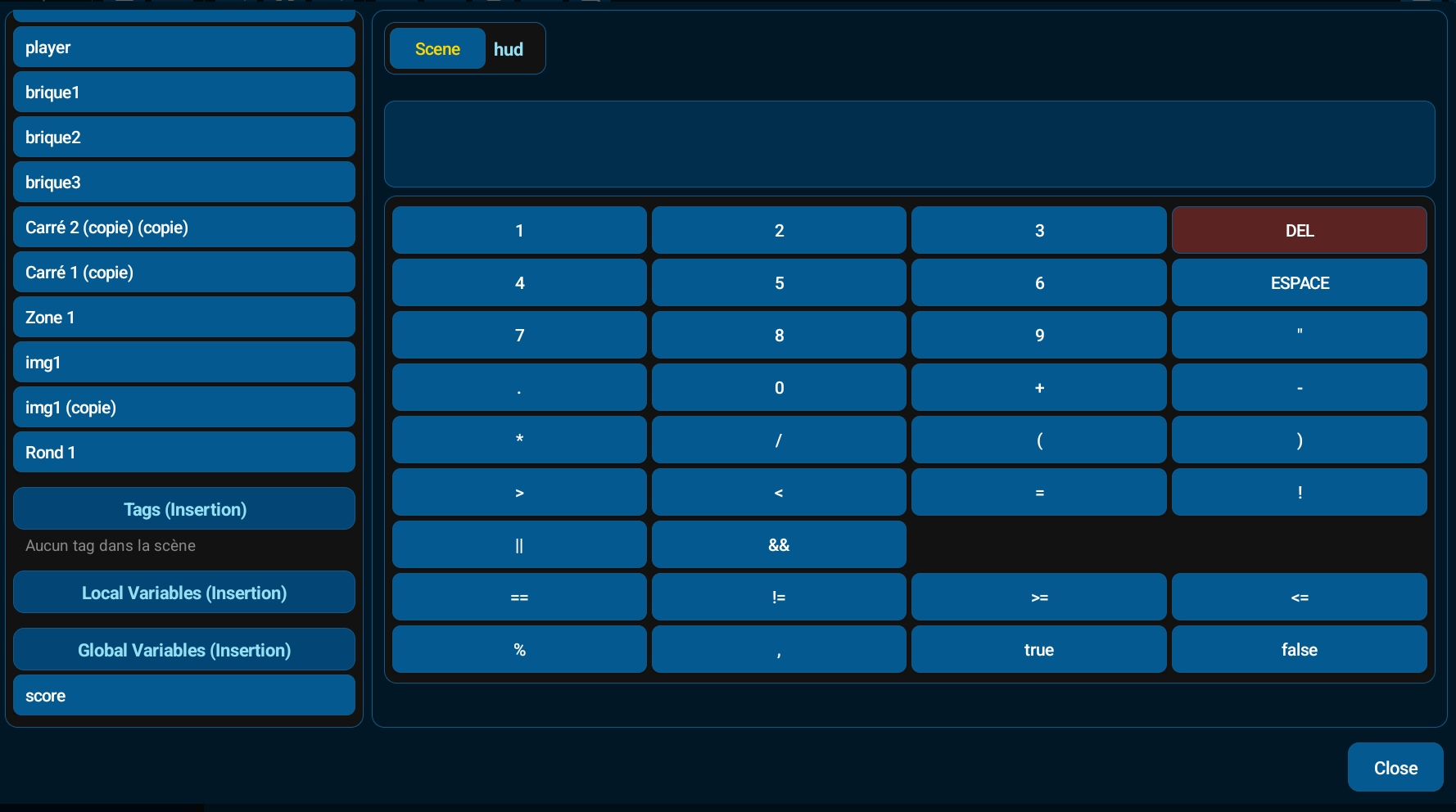
Tap a node to set it up: the window first shows what it acts on (① On what?), then its settings (②). Pick images, sounds or animations from lists, and answer "yes" or "no" with a tap. Small formulas like score + 1 use variables, finger position, the joystick, time or object properties: just tap a helper on the left, and an "In plain words" line explains the formula in words.
Example games included
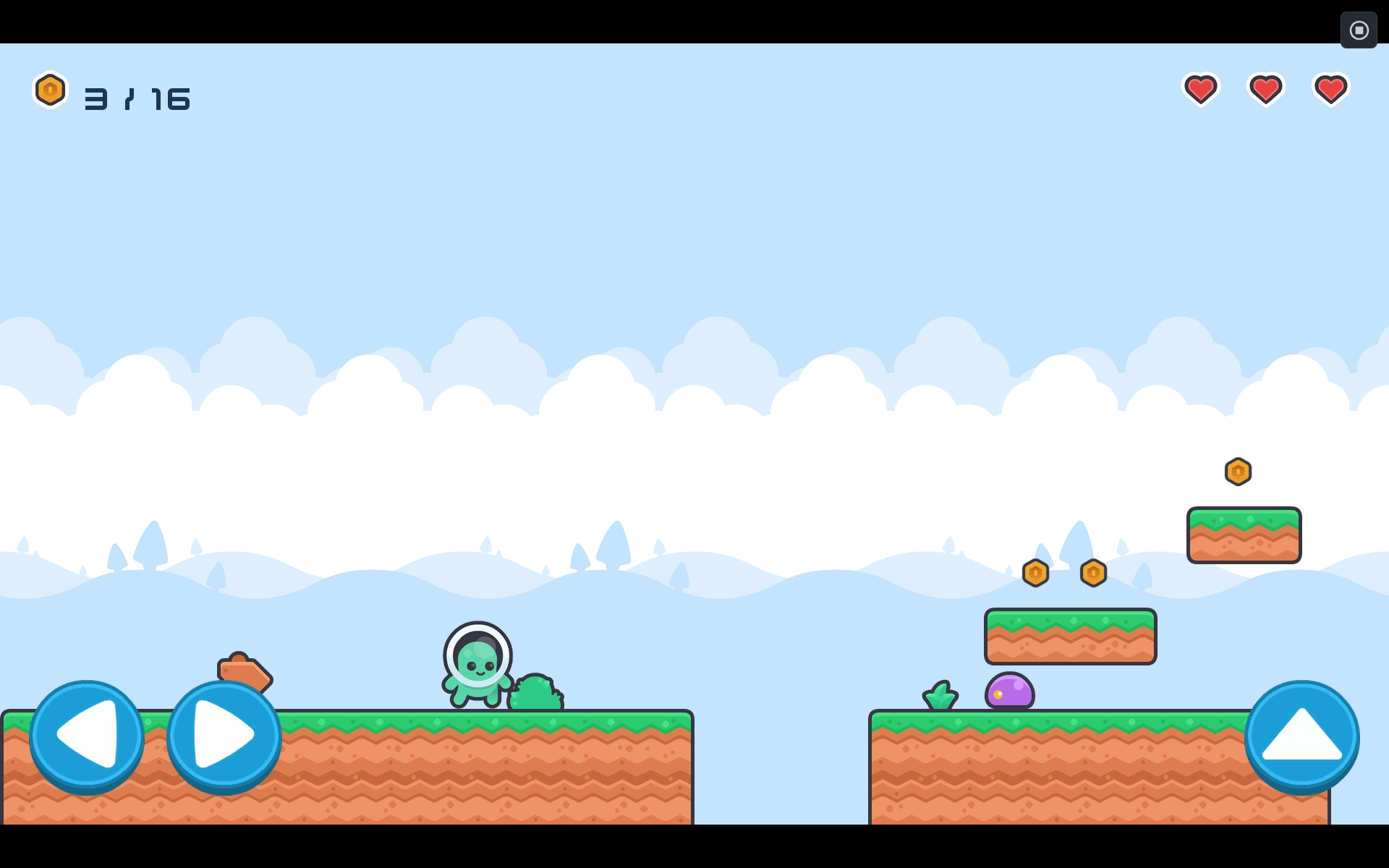
Nineteen example games can be downloaded from the engine's "Examples" tab: Neon shooter (ship arcade), Neon jump (platformer with a following camera), Platformer (coins, enemies and 3 lives), Climb & run (a character that walks, jumps, crouches and climbs ladders on its own), Maze chase (a maze where two flies chase you), Pirate battle (a naval battle against pirates), Candy match (match 3 candies), Memory cards (find the matching pairs of cards), Nexus UI (a futuristic interface: menus, options, shop), Firefly Night (a choice story with 4 endings), Dungeon walk and Dungeon escape (an isometric dungeon to explore, then escape), Crypt key (a top-down dungeon: trapdoors, spikes, a guard and a key), Lost on the moon (a choice-based story in 9 languages) and a showcase of every visual effect. Open them, play them, then change them to understand how everything works. New: Filters showcase, 32 screen filters and 19 transitions to try with a single tap. Hana Has an Urgent Question, an absurd dialogue comedy with 5 endings. Ruins maze, a huge isometric maze of ruins to explore by the light of a single torch. Space 1, a vertical space shooter drawn like a sketch, with a boss, guided missiles and extra-life bonuses. See all examples →
On Tablets and Phones
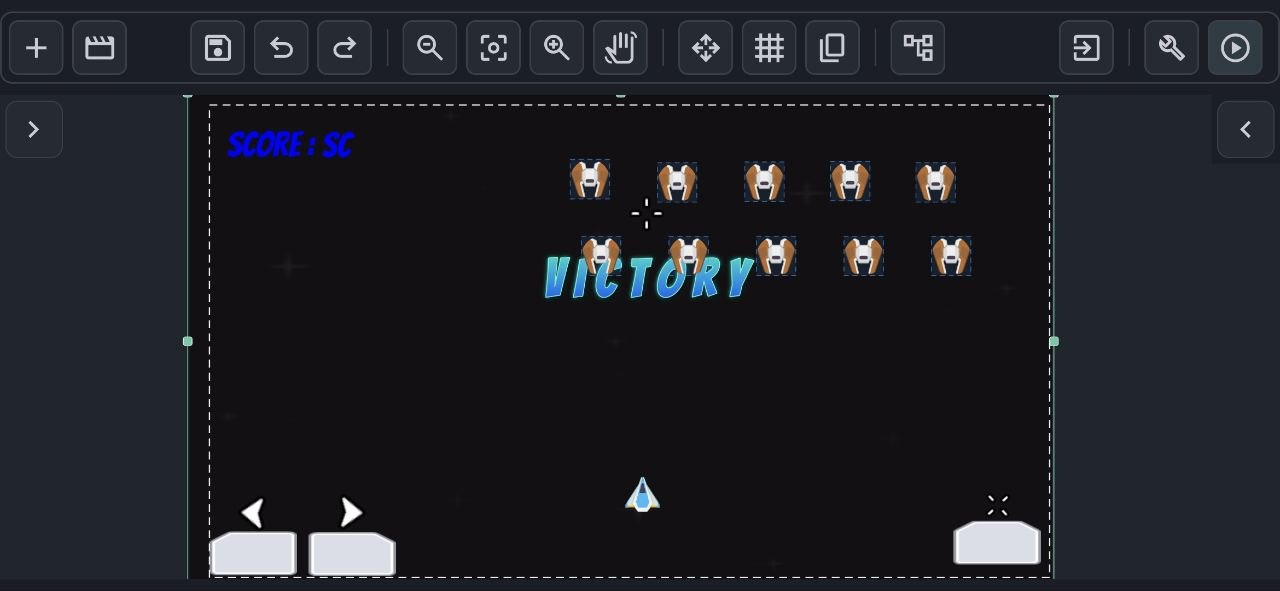
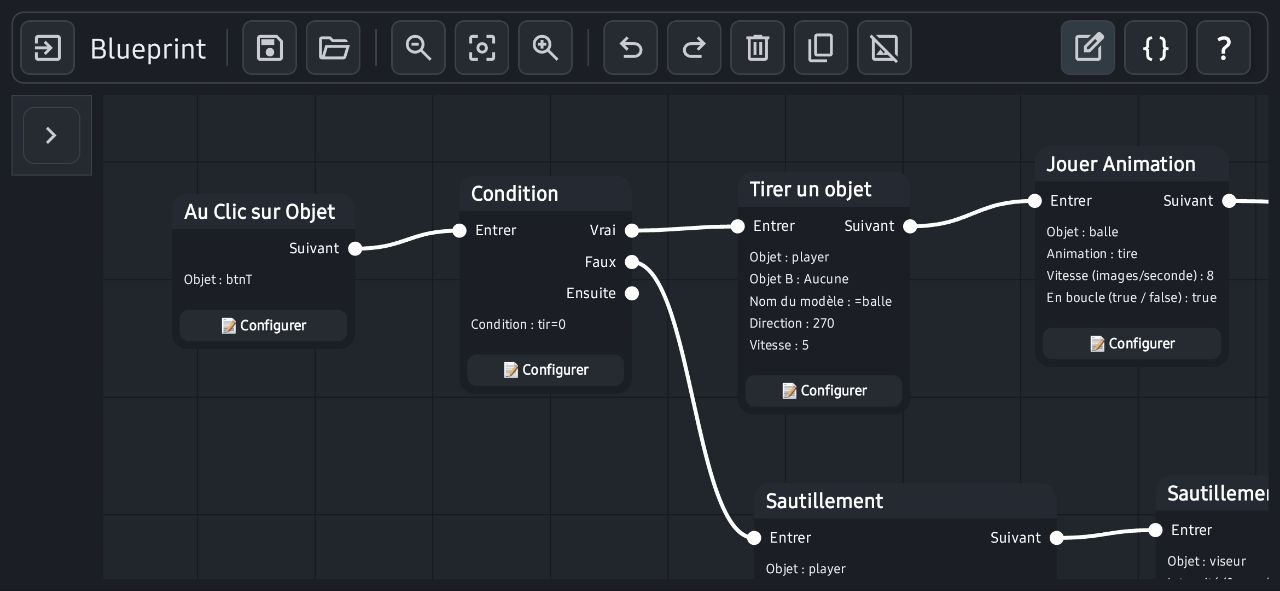
Tablets offer the most comfortable experience, but Yop2D also runs on Android phones in landscape mode. On small screens, the panels switch to a compact layout to leave as much room as possible for your scene. The top bar scrolls with your finger and pinch zoom follows your fingers.
Engine Capabilities
No-code visual nodes
158 nodes to build your game logic by connecting blocks, with simple formulas when you need them.
47 beginner templates
A "Templates" tab with small projects sorted by category: each one shows a single thing and explains which node does what.
Dialogue games (visual novels)
Choice stories like with Ren'Py, but with no code and on a tablet: characters with emotions who blink and talk, text letter by letter, shaking or wavy words, big choice buttons (timed or locked), the player's name, history, 9 languages.
A real, complete visual novel
Title screen with "Continue", autosave at every line and 5 save slots with a picture, a ◀ Back button (even before a choice), endings to discover and a gallery of souvenir pictures, player settings (text speed, volumes, skip only what was already read), friendship hearts, a portrait in the text box, lines read aloud, choices as big illustrated cards, and a map of the whole story in the editor. The buttons fold into a single ☰ menu.
Animate your characters
An "Animate a character" node makes a character slide from one place to another, grow, jump or shake, with the duration and style you choose (even, smooth, bounce…). It can wait for the movement to end or let the story carry on.
Gallery, replayable scenes and music
The gallery on the title screen has three tabs: images and endings, scenes to replay and music. Mark the start and end of a scene with "Replayable scene": the player unlocks it by playing, then can watch it again whenever they like. Music they have heard can be listened to again too.
Novel mode
A "Novel mode" node makes the text fill the whole screen over a darkened background: lines pile up one under the other like in a book and the page turns by itself. You can switch it on and off at any time, for example for a night-time narration between two conversations.
Atmospheres, zoom and transitions
One node for rain, storms with lightning and thunder, snow, petals, fireflies, night, sunset or memories, with their sounds. Smooth zoom and circle, star or wipe transitions: for every game.
Screen filters and transitions
32 filters give the whole game a “look” with a single node, “Screen filter”: TV, VHS, black and white, underwater, nightmare, flashlight, Game Boy, neon, glitch… They fade in and out gently (“Stop the filter”). 19 transition shapes (circle, star, heart, curtain, clock, swirl…) let you move from one scene to another with “Change scene with transition”. The “Filters showcase” example shows them all with a tap.
Full screen on every phone
No more black bars on long screens: in ☰ → Game settings, “Fit the player's screen” offers “Keep the shape”, “Stretch” (objects placed in the corners go to the corners of the screen) and “Fill” (the scenery continues on the sides, nothing distorted). New projects start in “Stretch”.
The phone's Back button
The “Back button pressed” node reacts to Android's Back button: open a pause menu, go back to the previous screen or ask “Do you want to quit?”. Without this node, the Back button does nothing during the game, so nobody quits by mistake.
Your first game in 5 minutes
A built-in guide walks you through making a real little game step by step: try the game, add a node, connect it, set it up. At each step the engine shows you where to tap.
My animated hero and 4 missions
A 2nd built-in guide creates a hero who runs and jumps, with a ground, a background and music. Then 4 step-by-step missions continue in the same game: coins and a score, a patrolling enemy, a "Victory!" screen with confetti and sound, and finally the APK file to install on the phone. A bubble shows where to tap, and "✨ Do it for me" helps if you get stuck.
My first story in 5 minutes
A 4th built-in guide has you write a short choice story without importing anything or placing anything in the scene: a line by Hana, a question, two answers, then you play. At each step a frame shows where to tap, even inside windows.
Settings in plain words
A node's window first shows what it acts on, then its settings. Ready-to-tap helpers (finger and screen, joystick, time, objects, variables) and an "In plain words" line that turns each formula into a sentence. Simple names everywhere: "yes / no" instead of true / false.
Offline APK export
Your game becomes a real Android app, built on the tablet or phone itself, even without internet.
Scenes as objects (prefabs)
Any scene can be placed as an object inside another scene: perfect for a row of identical enemies or reusable pieces.
Tag targeting
Give objects a tag, and one node acts on all of them at once: move every enemy, destroy every coin.
Ready-made behaviors
In the "⚙ Object behavior" window, say what an object is: scenery, ground, falling object, platform character (walk, jump, ladders), top-down character or object dragged with a finger. Its animations (idle, walk, jump, climb) change on their own with the movement. Gravity, bounces, collisions, and "chase" or "flee" for enemies. An enemy can also patrol on its own: it walks back and forth, turning around at the edge of a drop or against a wall.
Pathfinding
A character or an enemy finds the shortest path on a grid by itself, going around walls: mazes, dungeons, strategy games.
Tilemaps
Paint levels from a tileset and mark solid tiles once: collisions are automatic.
Grids and puzzles
Nodes to fill a grid, match 3 identical pieces and shuffle the board: everything you need for a match-3 game like Candy match.
Isometric view
Objects go in front of or behind each other depending on their position, and the joystick follows the diagonals: perfect for dungeons and three-quarter view games like Dungeon walk.
Variables, inventory & saving
Score, lives, inventory lists, and saving or restoring the game state at any time.
Touch controls
Virtual joysticks, buttons and HUD overlays, with multi-touch: move and jump at the same time.
Pause & slow motion
The whole game follows pause and slow motion, while your pause menu keeps working.
Dialogue, sound and camera
Text dialogue, sound effects with volume control, looping music, a camera that follows the player within the level limits, camera shake and vibration.
Particles and visual effects
13 particle presets (explosion, fire, smoke, rain, snow, hyperspace, shockwave…), trails, glow, electrocution, hit stop, flash, tint, vignette and screen fade.
Games in several languages
Write each dialogue in several languages: the game automatically shows the language of the player's phone, or the one chosen in a menu.
A simple, comfortable editor
A toolbar cut down to the essentials (a single + button for objects and scenes), a clean style where only the active tool lights up in blue, a full color picker, a large window for writing texts, animations picked folder by folder, and a "move only" mode to tidy up nodes without breaking links.
A clear Inspector
The selected object shows its thumbnail and name, a padlock to lock it, collapsible sections, sliders for opacity and rotation, and a chain to keep proportions when resizing.
Built-in Yop2D library
No need to hunt for images elsewhere: about 420 images sorted by theme (characters, enemies, objects, floors, backgrounds, buttons), many of them animated ("With its animations" sets everything up), sound effects and music, 10 fonts and ready-made titles. The "Packs to download" tab adds online packs (Pirates, Space, Hologram interface, Special effects, Plane, Monsters, Touch gestures).
Ready-made objects to download
A "Prefabs to download" tab in the Library offers objects that already have their behaviour: animated buttons (a spinning star, a pixel ninja strolling along the button, pulsing neon, shiny glass, a round ▶ button…), free and CC0. Tick several, download them in one go, then "Add to the scene": images, fonts and nodes come along, and each copy reacts on its own. Everything stays editable, and you can import your own prefabs as a .zip. Each prefab you add becomes its own scene: touch it in the Scenes list (shown under the scene that uses it) to change the image, the colour, the text or the nodes, and every copy follows. Interface pieces are offered too: ON/OFF switch, animated health bar, popping score and pause window.
A dialogue style to your taste
The dialogue style is set without code: colours, transparency, shape, frame images that don't get distorted, text outline, a fully customisable window where the player types their name, the character's bust overlapping the box (left or right) and a smooth highlight for the speaker (they rise, the others sink). Every setting is separate: you can keep one without the other, for example without dimmed lighting.
Discover the editor
A 3rd built-in guide explains the interface: pick and move an object, resize and rotate it, lock it, undo, move the view and zoom. A card shows where to tap and turns almost transparent when you touch the scene.
Choose your language
At first launch, a window offers the 9 languages, with the phone's language already selected. Every text in the engine is translated, error messages and APK export included.
Objects sorted into folders
In the scene's object list, create folders and subfolders and drag your objects into them with your finger. Choice lists (node target, variables, parent) follow this order, along with tags and kinds of objects: no more endless lists.
Crisp pixel art
A game setting keeps pixels perfectly sharp when you enlarge pixel art images. The Prehistoric and Ninja packs of the library are made for it.
Portrait games
Pick landscape or portrait when you create a game (or in ☰ → Game settings): vertical shoot'em ups, card games, puzzles. The ▶ button turns the screen upright by itself and the exported game stays vertical.
Guided missiles and explosions
One node fires a missile that starts in one direction, then slowly turns toward its target, like a real arcade game. If it hits nothing, it explodes at the end of its lifetime. Another node destroys an object after a delay, handy for explosions.
Fully customizable dialogues
For dialogue games: colors, transparency, shape and outline of the text, picture frames that don't stretch, answer buttons, title screen, the window where the player types a name, how long and how characters appear, a portrait that sticks out of the box, and a highlight on whoever is speaking. Every setting has a preview.
FPS counter and time
Two values you can use in any formula: “fps” (frames per second actually displayed) and “delta” (time since the last frame, in seconds). A text with ="FPS: " + fps is enough to show a counter.
Your game's own icon
Choose the icon of your exported game: any image, with zoom and position set on a square preview. On the phone's home screen your game keeps its own icon instead of the Yop2D logo.
Games in the player's language
In a game exported as an APK, buttons, settings and the title screen follow the game's "language" variable, or else the phone's language: a Russian player sees Russian, a Japanese player sees Japanese.
A tile editor made for fingers
The whole tileset image with its grid, the cell size guessed for you, blocks of several tiles as a stamp, pinch to zoom. Brush, eraser, rectangle, fill, eyedropper, random tile and redo; solid tiles are marked right on the image.
Dialogue buttons and screens in your colors
Round icon buttons (back, history, auto, skip, save, settings) with the size, colors and frame image of your choice; restyle the save, settings and gallery screens; a button to go back to the title screen from the settings.
Import your MP3s, Yop2D converts them
An imported MP3 is converted to OGG automatically (Android 10 and above): music loops cleanly on every phone.
Automatic saving
No more forgetting the 💾 button: the project and the Blueprint save themselves at a regular rhythm (30 s, 1 min or 5 min, your choice), when you leave the Blueprint, switch apps and right before ▶. Nothing is saved while the game runs.
Switch scene without leaving the Blueprint
A button with the scene's name at the top of the Blueprint opens the list of scenes: pick one, the current Blueprint is saved and the other scene's Blueprint opens right away. Handy for copying nodes from one scene to another.
A clearly visible camera area
Choose the color of the camera frame (red, yellow, green, cyan, white, black…) and its line style (dashed, solid or thick): it stays visible on any background.
Free-form zones: walls and pens
Draw a zone with as many points as you like and decide whether nobody can enter it (a wall) or nobody can leave it (a pen). Perfect for mazes, arenas and rooms. A template shows it at a glance.
Make your own music
A "Music" tool in the Assets window: place ready-made blocks (calm, action, mystery, joyful, dungeon, pirate, sad) on 4 tracks — melody, chords, bass, drums — played by real instruments (piano, soft strings, bass, drums, free to use). You can build your own blocks in a note editor, ask "Give me an idea", listen on a gapless loop, then create an .ogg file saved in the Sounds folder of your choice and played by an ordinary node. Needs Android 10 or newer.
Check my game
A button that reviews your game and tells you in plain words what is wrong: a missing variable or object, a node connected to nothing, a required setting left empty, a missing file. One tap shows you where to fix it.
Exported game options
When creating the APK: icon, version number, launch image with fade, screen kept on, vibrations allowed or not. A new version installs over the old one, without uninstalling.
🏫 At school and for children
Yop2D is designed for learning by creating. Children can use it from about 8 years old with an adult (parent or teacher), and on their own from 11-12. In class, each student creates their own game on a simple tablet.
🔒 No personal data
No account, no e-mail, no ads, nothing to buy. Statistics are anonymous and can be turned off with one tap.
📶 Works without internet
Once installed, Yop2D works offline: handy in a classroom without Wi-Fi.
📱 On school tablets
Android 7 or newer, even on entry-level devices. No computer needed.
🌍 9 languages
The interface and the games exist in 9 languages: also ideal for a foreign language class.
🧭 Step-by-step learning
"Your first game in 5 minutes", 47 templates that each show one single thing, guided missions and settings explained in plain words.
🎓 School mode
An even simpler interface, without violent content (explosions, weapons) and without links to social networks, protected by a teacher code.
How does school mode work?
- On the start screen, tap the 🎓 button next to "Language", turn on "School mode" and choose what changes.
- Gentle content: explosions, weapons and shooting disappear from the library, along with fighting examples and templates and the "Shoot an object" node.
- Simplified interface: only about fifty basic nodes (move, jump, variables, texts, sounds, conditions, scenes…) and no advanced tools.
- No external links: no Discord, no Telegram, no packs to download.
- The teacher chooses a 4-digit code: it is asked to change or turn off school mode. After a wrong code, you have to wait 30 seconds. The code stays on the tablet, nothing is sent.
Projects already started keep working: school mode only changes what is offered.
Are you a teacher? Let's build Yop2D together
A quiz on today's lesson, an interactive story, an English vocabulary game… Tell us what your class needs: we can prepare templates for your lessons, add a language or a feature, and answer your questions. Yop2D is made by an independent developer who reads every message.
💬 Discord : zinzin0000 · Yop2D Discord
Beginner Guides
Step-by-step answers to the most common beginner questions, written with the real nodes of the engine. You can also read them inside Yop2D, in the help of the node editor.
Make a character jump
Gravity, a solid floor and a jump button, with no jumping in mid-air.
Collect coins and count the score
A tag, a score variable and a text that shows the points.
Lose health and Game Over
A health variable, a health bar and back to the start when health reaches 0.
Go to the next level
One scene per level, a finish zone and a score that carries on.
Particles and effects
An explosion when you touch an enemy, a trail behind the ship, a screen flash and a fade.
Choice story (visual novel)
A character who talks, a question, several endings, a title screen with “Continue” and friendship hearts.
A ready-made object
Download an animated button, drop it into your scene and customise it.
Create your music
Stack ready-made blocks on 4 tracks and get a music for your game.
Node Reference
All 158 nodes of Yop2D on one page: what each node does, its settings, its outputs and an example. The names are exactly the ones you see in the node editor.
Yop2D compared to other engines
There are excellent game engines. Here is an honest comparison to help you choose, including what Yop2D does not do.
| Engine | Where you create | How you program | 2D / 3D | Price | Your game runs on |
|---|---|---|---|---|---|
| Yop2D | Android app (tablet, phone), works offline | Visual nodes, no code | 2D | Free, no ads; sell your games freely | Android (APK built on the device) |
| GDevelop | Computer, web browser, mobile app | Events, no code (JavaScript optional) | 2D and 3D | Free and open source; paid plans for more online services | Android, iOS, web, computer (mobile builds made online) |
| Construct 3 | Web browser (also on tablets) | Event sheets, no code (JavaScript optional) | Mainly 2D | Paid subscription; limited free version | Android, iOS, web, computer (mobile builds made online) |
| Godot | Computer, web browser, Android editor | Code (GDScript, C#) | 2D and 3D | Free and open source | Android, iOS, web, computer |
| Ren'Py | Computer (Windows, macOS, Linux) | Simple script (Ren'Py language, optional Python) | 2D, specialised in visual novels | Free and open source | Computer, Android, iOS, web (mobile versions built on the computer) |
Simplified summary as of October 2026. Engines change quickly: check each engine's website for details.
Yop2D is made for you if…
- you only have an Android tablet or phone, and no computer;
- you want to create anywhere, even without internet;
- you don't want to learn a programming language;
- you want a free tool with no ads, no subscription and no watermark in your games;
- you want to write a choice story (visual novel) without learning a script, and maybe mix in a real game (puzzles, platforms, fights);
- you want to share your games as Android apps with friends, family or students, or publish them on itch.io and other platforms that accept APK files, for free or for sale.
What Yop2D does not do (yet)
- Your games run on Android only: no iPhone, web or computer version.
- No AAB export yet, the format required to publish on Google Play. It is planned for a later version.
- 2D only.
- The community and the number of tutorials are still growing, and a few bugs are possible: fixes arrive fast, often within days.
- No scripting language for experienced programmers: everything is done with nodes.
- The engine is free, but its source code is not public.
When another engine is a better choice
- You need iPhone, web or computer versions of your game: GDevelop, Construct or Godot.
- You want to learn real programming or make 3D games: Godot.
- You work on a computer and want a no-code engine with a large community: GDevelop or Construct.
- You are writing a long visual novel on a computer and want the reference tool, very complete, with a large community: Ren'Py.
Frequently Asked Questions
What is Yop2D?
Yop2D is a free, no-code 2D game engine for Android. It lets anyone create a complete video game on a tablet or phone with visual nodes, without programming knowledge, and export it as an APK directly on the device.
Is Yop2D really free? Are there ads?
Yes, Yop2D is 100% free: no subscription, no in-app purchases, no hidden fees. There are no ads in Yop2D, and there never will be.
Who owns the games I make? Can I sell them?
Your games belong to you. You can keep them, give them away, share them or sell them, without asking permission and without paying anything to Yop2D.
Can I make a visual novel, like with Ren'Py?
Yes. Yop2D has nodes made for dialogue games: "Say a line" (character, emotion, text letter by letter), "Ask a choice" (one output per answer, timer, locked answers), "Change the background", "Ask the player for a text" (their name) and "Atmosphere" (rain, storm, snow, night…). Characters have a sheet with one picture per emotion; they blink and talk. Everything is done with your finger, no code, and the game can be in 9 languages. Open the "Choice story" template or the Firefly Night example to start. There is also a title screen with "Continue", autosave and 5 save slots, the ◀ Back button, endings to discover with a gallery, player settings, friendship hearts, read-aloud and a map of the whole story. The "My first story" guide shows how to start in 5 minutes. Characters can slide, grow, jump or shake ("Animate a character"), and there is a full-screen novel mode as well as a gallery of replayable scenes and music.
Is there a Yop2D logo or watermark in my games?
No. The games you export contain no Yop2D logo, splash screen or watermark.
Is Yop2D open source?
No. Yop2D is free to use, but its source code is not public. This changes nothing for your games: they are entirely yours.
I don't know how to code. Is that a problem?
Not at all. Yop2D replaces code with visual nodes that you connect together. It is made for beginners and for creators who prefer to focus on their game. The beginner guides show you how, step by step.
Which devices does Yop2D run on?
Android tablets and phones with Android 7.0 or newer. Tablets are the most comfortable; on phones, Yop2D works in landscape mode with a compact interface. There is no version for iPhone, iPad or computer.
Do I need a computer or an internet connection?
No. Yop2D creates and exports your game as a standalone APK directly on your device, 100% offline. No cloud build, no account.
Can I publish my game on Google Play?
Not directly yet. Yop2D exports APK files: you can install them, share them, or publish them on sites that accept APKs, such as itch.io. Google Play requires the AAB format signed with your own key: this export is planned for a later version.
Can I play my Yop2D game on iPhone, on the web or on a computer?
No. Games made with Yop2D are Android apps. If you need other platforms, see the comparison for engines that support them.
What kinds of games can I make?
2D games: platformers, top-down adventures, shooters, arcade and puzzle games, quizzes, interactive stories… The tile editor, physics, collisions, animations, dialogues, inventory and saving cover most needs. Yop2D does not make 3D games.
Can I use my own images, sounds and music?
Yes. You import your own images, tilesets, animation frames, sound effects and music. Titles and text effects are created directly in the engine. The engine also includes a library of about 420 images (many animated), sound effects, music, fonts and ready-made titles, plus packs to download: no need to look elsewhere to get started.
What languages is Yop2D available in?
The interface, the built-in help, the guides and the node reference are available in 9 languages: English, French, Spanish, German, Italian, Portuguese, Russian, Simplified Chinese and Japanese.
How do I learn to use Yop2D?
Start with the "Your first game in 5 minutes" guide: it has you build a real little game step by step, showing you where to tap. Open the "Templates" tab: 47 small projects that each show a single thing, with an explanation on screen. Then play with the nineteen example games and follow the beginner guides. The node reference explains all 158 nodes, and the YouTube channel, Discord and Telegram are there to help. In the engine, the "My animated hero" guide and its 4 step-by-step missions (☰ → Step-by-step missions) go even further, all the way to the game installed on your phone. The "Discover the editor" guide explains the interface: move, resize, rotate, lock, undo.
What is a prefab in Yop2D?
A prefab is a ready-made object: it comes with its image, its text and its nodes already connected, for example an animated button. In the editor, open the Library, "⬇ Prefabs to download" tab, download one or several, then tap "+ Add to the scene". Prefabs are free and CC0. You can edit them as you like and import your own from a .zip file. Not to be confused with "Scenes as objects", which lets you reuse one of your own scenes. A step-by-step guide exists: "How to add a ready-made object?". Each prefab you add becomes its own scene: touch it in the Scenes list (shown under the scene that uses it) to change the image, the colour, the text or the nodes, and every copy follows. Interface pieces are offered too: ON/OFF switch, animated health bar, popping score and pause window.
How do I resume a mission halfway through?
Open your project, tap ☰ then "Step-by-step missions" and choose the mission. The bubble starts again from the first step: tap "Skip" to jump over the steps you've already done, or "◀" to go back to a previous step. A finished mission shows a ✓ and can be done again.
Why does Android show a warning when I install the APK?
Because the APK is downloaded outside the Play Store. Tap More details, then Install anyway. You can also join the closed test on Google Play: how to become a tester.
Does Yop2D collect data?
Yop2D sends anonymous usage statistics: when it is opened and closed, how long it was used, and crash reports (type of error only), with the app version, Android version and device language. The country is estimated from the connection, without storing the IP address. No personal data and nothing from your projects. You can turn it off on the home screen, and the games you export send nothing. Details: privacy policy.
Is Yop2D finished?
Yop2D is in active development and in closed testing on Google Play. It is already usable to make complete games, but bugs are possible: export your projects regularly as a backup, and report problems on Discord or Telegram.
Who makes Yop2D?
Yop2D is made by an independent developer, with the feedback of its community of testers.
How is Yop2D different from GDevelop, Construct or Godot?
Yop2D is designed to work entirely on an Android tablet or phone, without code, without internet and without a computer, and it stays free with no ads. In return, it only makes 2D games for Android. See the detailed comparison.
Can Yop2D be used in class?
Yes. Yop2D is free, with no ads, no account and no personal data, and it works offline on ordinary Android tablets. School mode (the 🎓 button on the start screen) simplifies the interface, hides violent content and external links, and is protected by a teacher code. Teachers can write to us to adapt Yop2D to their class.
Is Yop2D suitable for children?
Yes, from about 8 years old with an adult (parent or teacher), and on their own from 11-12. The built-in guides show where to tap, the templates explain one thing at a time and the settings are written in plain words. School mode makes the interface even simpler and gentler.
How do I change my game's icon?
Open ☰ → Game settings → Game icon, pick an image, adjust the zoom and position, then save. The icon is applied when you build the APK; without a chosen icon, the Yop2D logo is kept.
How do I create my own music?
In the Assets window, touch the "Music" button (Android 10 or newer). Place ready-made blocks on the 4 tracks (melody, chords, bass, drums), or build your own in the note editor, listen on a loop, then touch "Create the sound (.ogg)": the file is saved in the Sounds folder of your choice and plays with the "Jouer la musique" node. The instruments are free to use (CC0). A step-by-step guide exists: "How to create your own music?".
What can Yop2D do today?
In the editor: undo and redo (in the scene and in the Blueprint), automatic saving, copy-paste, folders to organise objects and files, grid snapping, several scenes, instant test with the ▶ button and a "Check my game" button that spots what you forgot. To create: 158 nodes, tile editor, animation editor, music maker, dialogue games with save slots, screen filters, particles, pathfinding, 47 templates and step-by-step guides. To share: APK export on the device with your own icon, version number and launch image. Current limits: Android and 2D only, and an independent developer who updates the engine very often.
Join the Community
Yop2D is an independent project under active development. Report bugs, share your games, suggest features or help improve the translations.