ℹ️ Needs Yop2D version 1266 or newer (the last number of the version, for example 1.0.1266). If your version is older, update Yop2D.
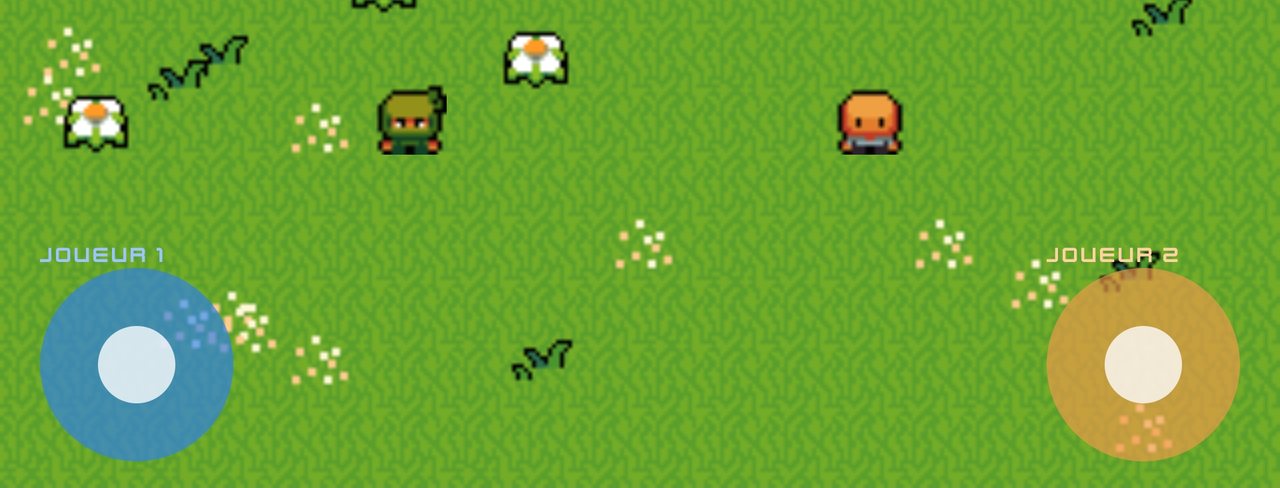
On a tablet, two people can play at the same time: each player has their own joystick and their own character. Yop2D follows each finger separately (multi-touch), so both characters move together, without any node.
- a project open in the editor (landscape, ideally on a tablet);
- two characters, for example player1 and player2 (two Image objects);
- a floor or a background, as you like.
Step 1: two characters that walk by themselves
- Select player1, then tap ⚙ Object behavior in the Inspector.
- Choose Top-down character (or Platform character).
- On the Controls line, keep Joystick.
- Do the same for player2.
Step 2: two joysticks
- Add a Joystick object to the scene (category Interactives) and put it at the bottom left.
- Add a second one and put it at the bottom right.
- Give them clear names: joystick1 and joystick2 (the last step explains why this helps).
Step 3: one target for each joystick
- Select joystick1. In the Inspector, section “Joystick Control”, tap the “Object to move” button and choose player1.
- Select joystick2 and choose player2 the same way.
- Save, then start the game.
Put one finger on each joystick: both characters move at the same time, each one with its own joystick. Lift one finger and only that character stops.
Go further: read each joystick in a formula
The first joystick keeps its usual formulas: joystick.x, joystick.y, joystick.force, joystick.angle, joystick.actif. For the others, give the joystick a name that starts with “joy”, then use the same words after the name: joystick2.x, joystick2.y, joystick2.force, joystick2.angle, joystick2.actif.
For example, to move an object that is not a character with the second joystick, use “Push object” linked to “Every frame” with =joystick2.x * 5 and =joystick2.y * 5.
.x and .y: they give the direction pushed (between -1 and 1).Jump buttons for each player
Platform characters can also have their own jump button: in ⚙ Object behavior, choose a different button for each character in Jump button. Multi-touch lets both players press at the same time.
The “Two players” template shows all this ready to use: two ninjas, two joysticks, and no node.
If it doesn't work
- Both characters follow the same joystick: check that each joystick has its own target in “Object to move”.
- A character does not move: its behavior must be Top-down character or Platform character, with Controls: Joystick.
- A joystick does not react: make sure it is visible and not hidden behind another object.
- Only one joystick works: check that you are using version 1266 or newer of Yop2D.